
Native Mac journal · Free and open source
Little things done.Worth remembering.
A feature finished, a few pages read, or a walk outside.
Write a line on today's note. Come back to any day whenever you have more to add.
Apple silicon · macOS 14+ · Native glass and spring motion on macOS 27
Likes, ratings & anonymous comments ↓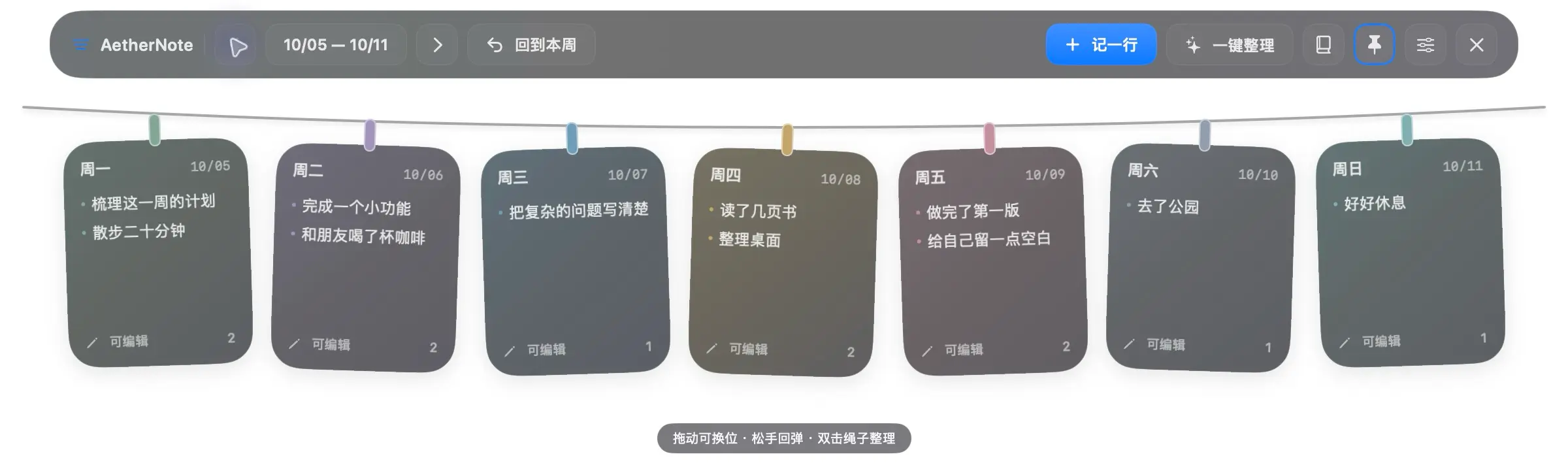
Write a line. Look back on a week.
Today's notes and past entries remain editable. The weekly review follows calendar order, ready to read, copy or export.



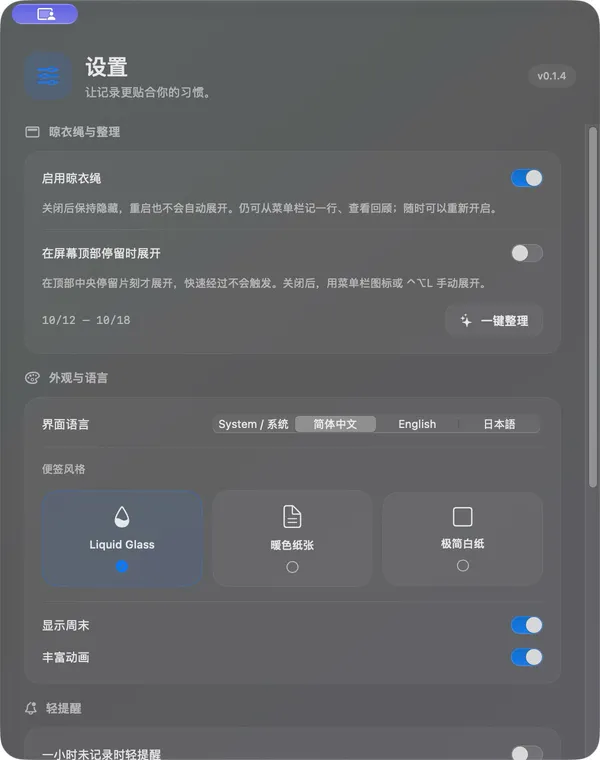
Actual captures on macOS 27. The editor shows 0.1.5, the clothesline and Settings show 0.1.4, and other views show 0.1.3. All entries are demos in the Chinese interface.
Easy to write. A pleasure to revisit.
No task list to maintain and no long diary to write. Just keep a few things you did today.
One line per moment. Any past day is editable.
Return adds an entry and pasted lines become separate entries. Unsubmitted drafts save automatically. Add something you missed yesterday or correct an entry while keeping its original date.
Give it a tug. Tidy with a click.
Drag notes sideways to reorder, pull them down to spring back, or tug the rope itself. Click the labeled Tidy the line button or double-click the rope to restore calendar order. Start with five weekdays and show up to seven days. Return from any distant date with the This week button.
Glass, warm paper, or a clean sheet
Each day gets a soft automatic color, with presets and custom colors saved by date. Switch between Chinese, English and Japanese. macOS 26 and 27 use native glass with spring-driven drag interactions, and earlier systems use translucent material. Reduced motion and transparency settings are respected.
Show it when you want it
Disable the clothesline in Settings to keep it hidden, including after relaunch, while continuing to write and review. Top-edge reveal is optional and off for new installs; when enabled, it needs a 0.6-second pause to avoid accidental reveals.
An hour later, just a small mark
After an hour without recording, a small mark appears in the menu bar. No sound, focus changes or automatic windows. Reminders wait while you type, reset after sleep and can be turned off.
Check, download, then relaunch
Choose Check for Updates in Settings or the menu, review the new version, download it, then install and relaunch after signature verification. Checks are manual, with no automatic downloads or forced restarts.
Give your writing room
Opening a day, review or Settings hides the clothesline and pauses top-edge reveal. It returns to its previous state after the windows close. The 500pt day editor stays steady while typing and gives entries more room during edits.
Can I edit a day after it ends?
Yes. From 0.1.1, today and all past days support adding, editing and deleting entries. Existing journals load without conversion. Future dates become available when that day arrives.
Are my notes uploaded?
Notes, drafts and backups are never uploaded. They stay on your Mac with no account, cloud sync or analytics. Manual update checks connect to the website and downloads use GitHub. The app does not encrypt local files.
Which Macs are supported, and how do I update?
Supports Apple silicon Macs on macOS 14 or later, with signed and Apple-notarized packages. Install 0.1.5 or later manually once from 0.1.0 or 0.1.1; later updates can be checked, downloaded and installed with a relaunch inside the app. Local notes are preserved.

AetherNote for Mac
What did you do today? Start with a line.
Free and open source · Stored locally · No account
Community
How has your experience been?
No sign-in needed. Share your experience.
Community rating
—/ 5
Loading…
One like and rating per browser. You can change them anytime.
No published comments yet. Be the first to share your experience.
Community comments
Newest first · Replies grouped by topic