
SSH · SFTP · Server metrics
Remote work,natively done.
Your terminal, files and server health in one native window.
Built with Swift 6 and SwiftUI, tuned for Apple silicon.
Apple silicon (M1 or later) / macOS 14+
Likes, ratings & anonymous comments ↓Formerly ApexTerm, with existing sessions and Keychain credentials preserved. The GitHub repository retains the ApexTerm name; downloads and release notes use AetherTerm.
Loading preview…
Preview could not be loaded
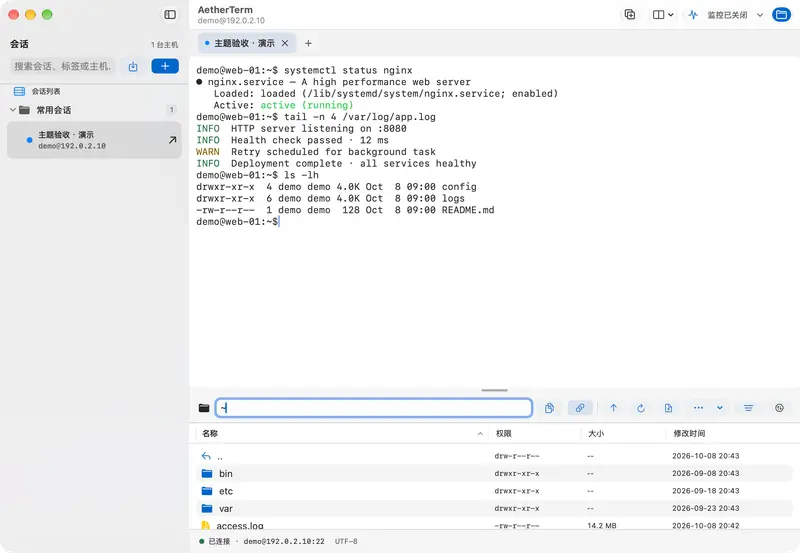
12 app themes · Native macOS 27 window screenshots · Demo data. App preview themes are independent of website appearance.
From connecting to troubleshooting.
Keyboard navigation and panes
Open a local terminal with ⌘⇧T, zoom or restore a pane with ⌘⇧Enter, and move focus with ⌘⌥arrow keys. Choose from installed monospaced fonts.
Tunnels and quick commands
Configure local, remote and dynamic SOCKS5 forwarding. Fill variables in reusable commands from the collapsible quick-command bar.
Command palette and bookmarks
Use ⌘P to find actions, hosts, paths and quick commands. SFTP presets and custom bookmarks provide quick directory access.
Everything you reach for, in one window.
The things you do most — terminal, files and monitoring — brought together, natively.
Terminal and files, linked
Type commands above and manage remote files below. cd somewhere in the terminal and the SFTP view follows (OSC 7).
Explore the details
- Built-in Quick Editor with line numbers and ⌘S in-place save.
- Bidirectional drag-and-drop with macOS Finder.
- Copy the current directory from the path bar and inspect full operation errors.
- Native Chinese IME optimization with intelligent Escape cancellation.
Live metrics without an agent
Nothing to install on the server. CPU, memory, network and disk are sampled over the existing SSH connection and charted natively.
Explore the details
- Swift Charts telemetry trends for 60-second CPU and memory history.
Credentials stay in the Keychain
Passwords and passphrases use macOS Keychain. The key vault manages Ed25519, RSA-4096 and ECDSA keys, with session bindings, SHA256 fingerprints and public-key deployment.
Broadcast input and keyword highlighting
Type once and send it to a group of hosts. Rules highlight keywords such as ERROR and FATAL as output arrives.
Inspect Linux processes and services
Inspect process CPU, memory and command lines over SSH, with search and sorting. Check systemd service status and send termination or reload signals to eligible processes.
Keep logs and copy command output
Record plain text or raw terminal streams with rotation at 50 MB. Use ⌘⌥C to extract the previous command output and choose the log folder in Settings.
Does the rename affect my sessions and passwords?
Not at all. Existing session storage, local preferences, and Keychain credentials remain fully compatible.
Is AetherTerm free?
Yes. It's free and open source under the MIT License.
Do I need to install anything on my servers?
No. Monitoring reads system information over the SSH connection; nothing needs to run on the server.
Where are my passwords and keys stored?
Passwords and passphrases stay in the local Keychain. Imported vault keys are stored in Keychain; file-based keys use your chosen local paths. SSH authentication does not upload private keys.

AetherTerm for Mac
Bring remote work back to native.
Apple silicon · macOS 14+ · MIT licensed
Community
How has your experience been?
No sign-in needed. Share your experience.
Community rating
—/ 5
Loading…
One like and rating per browser. You can change them anytime.
No published comments yet. Be the first to share your experience.
Community comments
Newest first · Replies grouped by topic