Codex · Claude · Antigravity
How much is left?
Just glance up.
Remaining quota and reset times for your AI subscriptions — in the notch, the menu bar or a sidebar.
Native Swift and AppKit. No Electron, no background browser.
Apple silicon / macOS 13+ · Sign in to each service's own app first
NotchQuota is an independent, unofficial tool and is not affiliated with OpenAI, Anthropic or Google. Codex, Claude, Antigravity and related marks belong to their respective owners.
Three ways to see it. Put it anywhere.
Compact in the notch, one click away in the menu bar, or a draggable sidebar on any display.
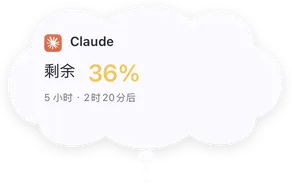
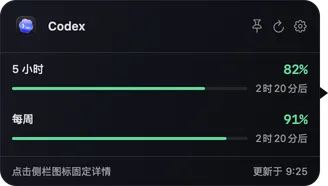
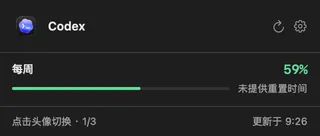
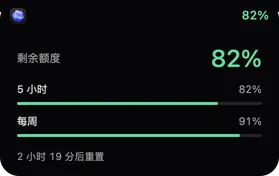
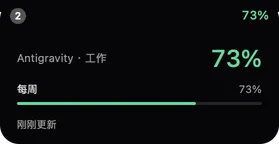
Rendered from the native v0.1.16 interface. Quotas, account names and times are demo data.
Light
Only the accounts you care about — and when data is uncertain, it says so instead of guessing.
Pick your accounts
Choose which accounts to show and drag to reorder. Unchecked accounts are never queried. The sidebar
Explore the details
- Consistent colors: green above 50%, yellow 20–50%, red below 20%. Unknown quota is gray, never treated as 0%.
- When a refresh fails, the last data is kept and marked as stale — never shown as 0% or 100%.
- Reset times that aren't provided are labeled as such rather than estimated.
The original apps don't need to stay open
Uses the sign-ins already on your Mac — no Homebrew, Python, Node or command-line tools required. A valid session and a network connection are still needed.
Explore the details
- Selected accounts refresh every 3 minutes, at most once per 30 seconds per account, and pause during sleep.
- Auto-rotation only reads the cache and never adds requests.
- Launch at login is supported. Nothing keeps running after you quit.
Temporary hiding and collapsed styles
Hide it for 15 minutes to 5 hours. When the sidebar collapses, choose a native capsule, frosted orb, mini gauge or the ghost.
Explore the details
- No looping animation at rest; animations stop while hidden or asleep.
- The sidebar remembers its position and display; moving the pointer or focus to another screen won't drag it along.
Signed
Ships as a Developer ID–signed, Apple-notarized DMG. Sparkle checks, downloads, verifies and installs updates in the app — and the update feed itself is signature-verified.
Where does the quota data come from?
Codex uses ~/.codex/auth.json and the ChatGPT subscription usage endpoint. Claude uses the Claude desktop app's signed-in session. Antigravity uses the Antigravity 2.x macOS Keychain item and the matching Google quota service.
Does it upload my data?
No. NotchQuota has no server, no analytics and no telemetry. Credentials are only used in memory and sent over HTTPS to the service they belong to. They are never written to logs or preferences, and the original apps' sign-in files are never modified.
Does it support third-party API relay balances?
No. Only subscription quotas are supported; a third-party API key alone can't be used to look up an official subscription.
What if a quota shows gray or stale?
Gray means the data couldn't be read — hover or click to see why. It's usually an expired sign-in, a web verification step or a network issue; signing in again in the original app fixes it. Some of these quota endpoints aren't stable public APIs, so please report compatibility issues on GitHub — without credentials or cookies.
NotchQuota for Mac & iPhone
Your quotas
Apple silicon · macOS 13+ · Signed & notarized · In-app updates